 LingFrame AI
Choose the source photo
Scan the print flat
Use a flatbed scanner or photograph the print square-on in soft, even light. Move it out of a glossy frame if the glass reflects a window. Keep a full-resolution copy with the border and any writing before making a clean working crop.
Choose one readable face
Start with an individual portrait where the eyes, mouth and jaw are distinct. A creased group portrait gives you fewer usable pixels per face. If you want to highlight one relative, crop a duplicate with space above the head and below the chin.
Use the template
- Crop a copy in your photo editor if needed. Open the template workspace, check the accepted formats and size, and upload your prepared photo. Use the preview to confirm you selected the right file.
- Review the credits shown in the workspace. Select the creation button and sign in if prompted.
- Open the completed result, review it using the checks below, and save the version you want.
A portrait for a family reunion
Use a solo portrait of an adult relative. Start the edit with the still scan and a date only if you can verify it. Cut to the animation, then cut back to the original or another family photograph. Label the animated portion as AI-generated so it can travel separately without losing context.
Inspect the video sample
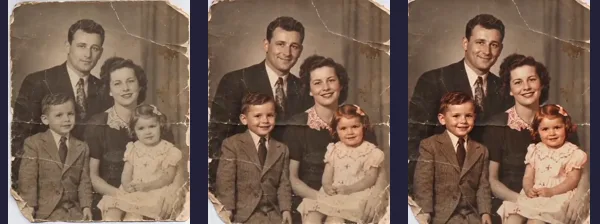
The reference clip shows a group portrait. Compare the faces in the opening and final frames, especially the children’s eyes and the adults’ mouth shapes. Small facial changes can alter how a relative is recognized.
For your next attempt For a single-person keepsake, crop a copy of a solo photo with both eyes, hairline and chin clear. Keep the family group print in the edit as a separate still if you want to preserve its original composition.
Review the result
- Compare the face
- Pause at the start, middle and end. Inspect the eye shape and mouth against the scan. An apparent expression can come from the animation, so keep only the take that fits how you want to remember the person.
- Protect the source
- Save the output as a separate file and carry the photographer or family credit into your edit when you know it. Before sharing a recognizable relative’s portrait beyond the family, check who controls the material and who has agreed to the use.
Questions
Can this repair a torn photo?
Make any essential restoration on a copy first. The template animates the image you submit. It cannot recover details missing from a tear or verify a reconstruction.
Will I hear the person’s real voice?
A still portrait contains no recording. If you have permission to use a genuine audio recording, add it separately and preserve its attribution.