 LingFrame AI
Choose the source photo
Use an uncluttered full-body pose
Start with both shoes visible and hands separated from the torso. Choose a front or three-quarter view with a level camera. A crop that cuts across a wrist or knee makes it harder to judge how the movement starts.
Leave space on the sides and at the floor
Keep just enough background to see the dancer’s silhouette. Give each hand room to travel and keep the floor visible below the shoes. Avoid busy crowds behind the main figure.
Use the template
- Crop a copy in your photo editor if needed. Open the template workspace, check the accepted formats and size, and upload your prepared photo. Use the preview to confirm you selected the right file.
- Review the credits shown in the workspace. Select the creation button and sign in if prompted.
- Open the completed result, review it using the checks below, and save the version you want.
A quick dance clip for a class recap
Use a photo of yourself against a neutral studio wall. Let the full first movement play before adding a caption. If the class uses a licensed track, add it in your editor or a platform that offers that track and line up the cut with a clear beat.
Inspect the video sample
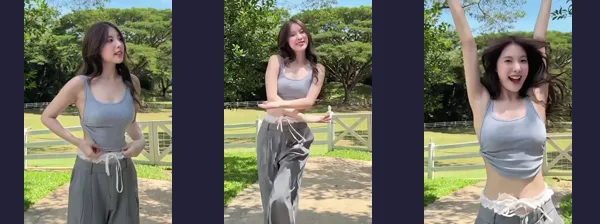
The product clip brings the dancer’s arms across the body. Watch the wrists when they cross and see whether the camera crop preserves the footwork. A strong face close-up can still be a weak reference for a full-length dance.
For your next attempt Use a full-body photo with the shoes and wrists inside the frame and room for movement on either side. Check the new clip again before cropping it into a social post.
Review the result
- Watch the feet and wrists
- Step through the widest movement and look for clipped fingers, sliding shoes, or a limb that disappears behind a prop. Check the first and last frame before you decide to loop the clip.
- Test a phone preview
- Before sharing, put your title and captions over the exported frame in the publishing app. Leave space for interface overlays and keep them clear of the main footwork.
Questions
Do I need to record a reference dance?
The template provides the motion. Start with the number of photos shown in the workspace. For custom choreography, choose a workflow that accepts the type of motion reference you have.
Does the clip include a specific song?
Check the exported file before editing. Choose audio you have the right to use rather than assuming a template includes a particular recording.